
How to send a document for signature quickly
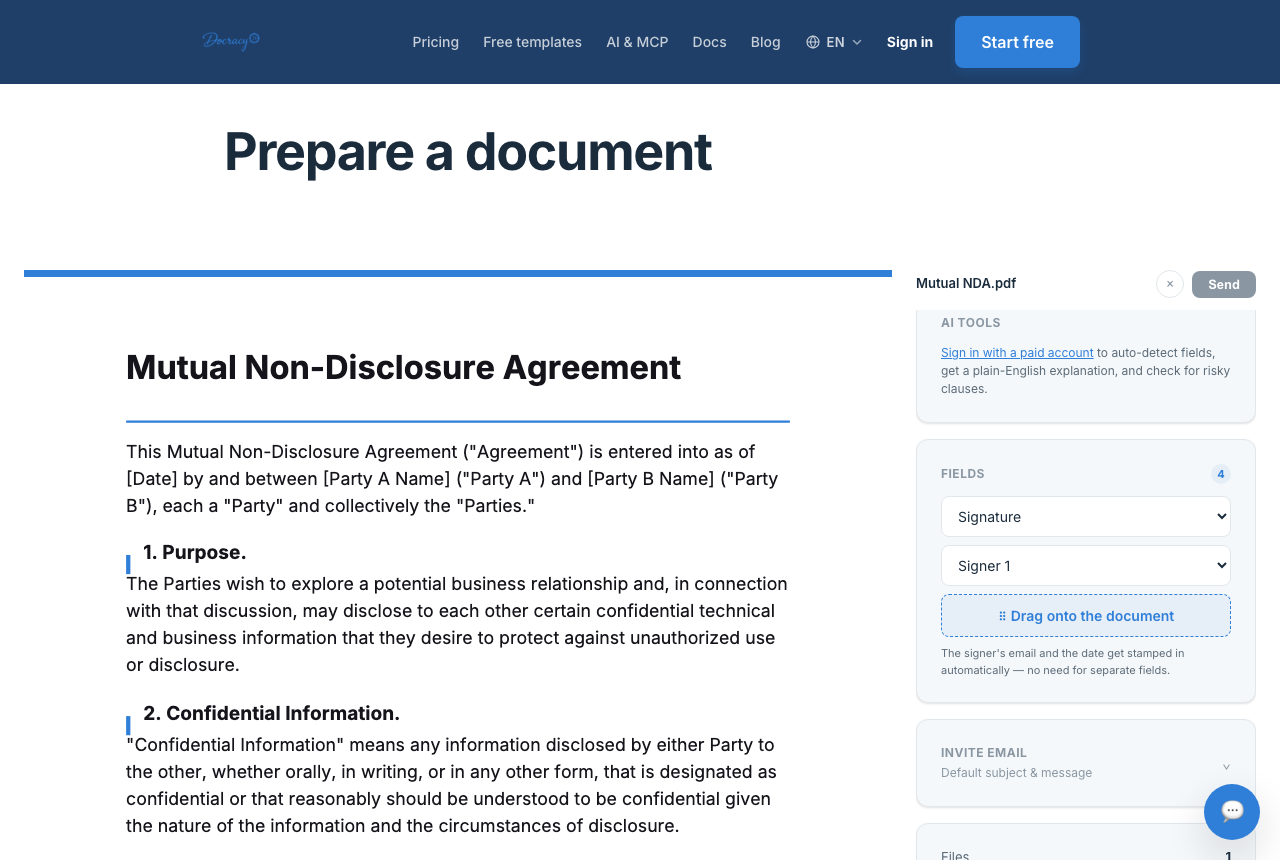

Sending a document for signature shouldn't be the slow part of a deal. In practice, the whole process reduces to three real steps: upload → add fields → send. Everything after that is on the recipient. What's worth spending time on instead is getting the workflow right for how many people actually need to sign, and in what order — that's where most of the avoidable delay actually lives.
Step by step
- Upload the PDF you need signed — a contract, an NDA, a form, whatever it is
- Add signature and date fields where each signer needs to interact with the document
- Enter the signer's name and email, and choose sequential or all-at-once order if there's more than one
- Send — the recipient gets a link by email (or WhatsApp) and can sign from any device without creating an account
Sequential vs. parallel signing
For a two-party contract, order rarely matters — both people can sign whenever it's convenient for them, so parallel (send-to-all-at-once) is usually the right default. For anything with an internal approval step — a manager needs to sign before the document goes to a client, or a co-founder needs to sign before an investor does — sequential signing enforces that order automatically instead of relying on someone to notice and forward it along at the right moment.
Mixed order with three or more signers
Once there are three or more signers, the order often isn't purely one or the other. A common pattern: two internal parties sign in parallel (they don't need to wait on each other), and then a final external party signs only after both internal signatures are complete. Setting this up just means grouping the signers correctly rather than defaulting everyone into one long sequential chain, which can needlessly slow down the parts that didn't actually need to wait.
Practical tips for multi-signer documents
- Label fields clearly by signer role (e.g. "Contractor signature" vs. "Client signature") so no one accidentally fills in a field meant for someone else
- In a sequential chain, one unresponsive signer holds up everyone after them — a reminder, or switching that signer to parallel if the order genuinely doesn't matter, keeps things moving
- Add yourself as a viewer or CC so you find out when a document is opened and signed, rather than hearing about it secondhand
Signing from a phone
A large share of recipients open a signing link from their phone, not a laptop, often straight from an email or text notification. That means the fields need to be sized and positioned so they're easy to tap without pinching and zooming, and the whole flow needs to work in a plain mobile browser — no app to install first. For signers who are more likely to check WhatsApp than an inbox, sending the signing link there instead is a real alternative delivery channel, not just a convenience — it's phone-bound and PIN-protected, which also raises the identity assurance behind the signature.
Templates for documents you send repeatedly
If the same kind of document goes out often — the same freelance contract to every new client, the same lease to every new tenant, the same work order format — a saved template keeps the field layout from having to be rebuilt each time. Auto-detect field placement can also speed up setup on a new document by recognizing common patterns like "Signature:" or "Date:" in the text — it's a helpful shortcut for typical contracts, not a substitute for checking the fields landed in the right place.
What slows this down in practice
- Forgetting to add a field a signer actually needs, which bounces the document back for corrections
- Sending to the wrong email address — always worth double-checking before hitting send
- Not adding yourself as a viewer or CC, so you find out a document was signed only when someone else mentions it
Frequently asked questions
How fast can a document actually get signed?
For a short document with a motivated signer, it's realistic to go from sent to fully signed in a few minutes — the bottleneck is almost always how quickly the recipient opens the message, not the signing process itself.
Do I need the recipient's permission before sending?
No formal permission is required to send a document for signature — but for the signature to be legally meaningful, the recipient does need to consent to sign electronically, which the signing flow itself captures as part of the process.
Can I change the document after it's been sent?
Not without restarting the process. Once a document is out for signature, the file itself is locked from further edits — that's a deliberate constraint, not a missing feature, since it's what keeps the eventual signed record trustworthy.
Why teams start with Docracy
“Docracy is a great product that I have tested and am using. It is easy to use, has good tools, is always up to date, and implements new features. Highly recommended.”— DACH Advisory


Also: Compare e-sign pricing · Free mutual NDA template
No account required for up to 2 signers.